



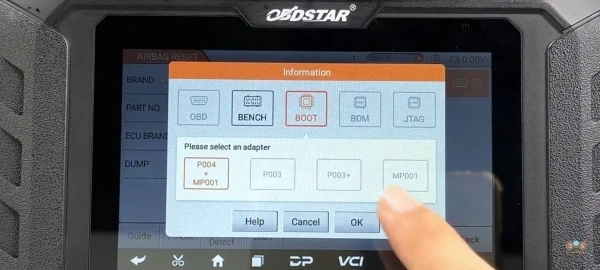
Many OBDSTAR P50 users ask why the one-key read/write options (such as pflash, dflash, pood4, or mp001) are not visible on their device screen, even though they see these functions in videos or tutorials.
Why the Read/Write Options Are Not Showing on Your OBDSTAR P50?
Not all vehicle models support direct read/write functions through the OBDSTAR P50. The availability of pflash, dflash, pood4, mp001, or similar options depends on:
- The exact ECU type and vehicle model/year
- The connection method (OBD, Bench, Boot, or TAG)
- Whether the specific ECU requires special adapters or boot mode
In most cases today, older BOOT mode has been replaced to JTAG mode on newer ECUs. Instead, the P50 often shows only basic options like “Read ECU Info” or requires manual selection of the correct connection type.
What to Do If You Cannot Find Read/Write on OBDSTAR P50?
- Provide the exact vehicle model, year, and ECU type (take a photo of the ECU if possible).
- Confirm your P50 software version is up to date (check via Update menu).
- Try different connection modes (Bench/OBD/TAG) following the official OBDSTAR guide.
- If the function is truly model-specific or region-locked, it may require a software refresh or authorized upgrade.
If you share the vehicle details and a screenshot of your current OBDSTAR P50 airbag reset tool menu, we can help check compatibility and guide you to the correct path for reading/writing flash data.
Read also:
OBDSTAR P50 Airebag Reset Tool FAQs
Leave a Reply